
Development
Developer Caches Eating Your Disk: npm, Gradle, NuGet, pip and More on Windows
On one Windows dev laptop, package and tool caches used more than 20 GB. Where npm, Gradle, NuGet, pip, Playwright and other caches live, how big they get, and the right command to clear each one.
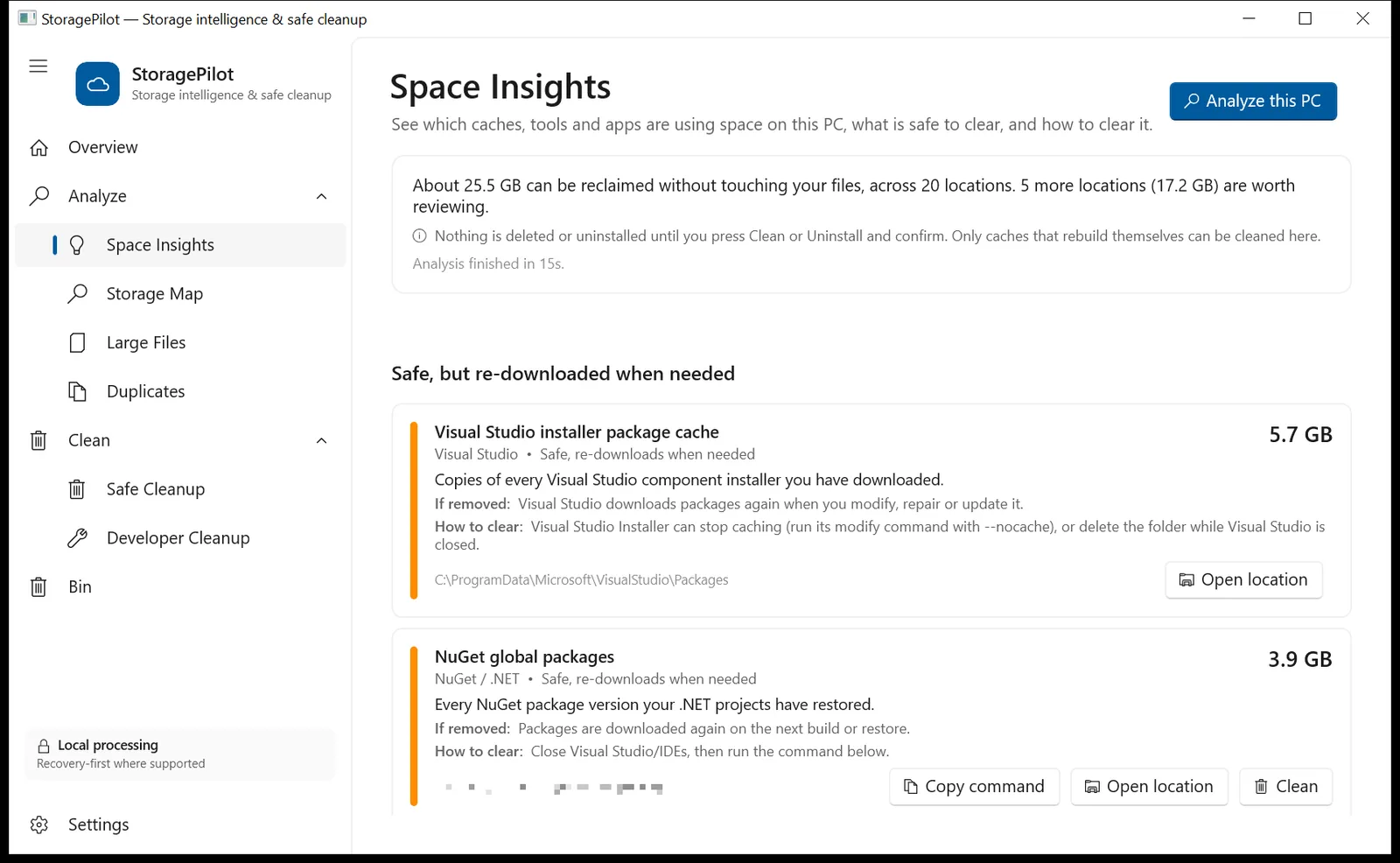
If you write code on Windows, your C: drive fills faster than anyone else’s. Every package manager, SDK and test runner keeps its own cache, none of them share, and almost none clean up after themselves.
On one Windows development laptop we measured more than 20 GB of developer caches, spread across a dozen hidden folders. Here is where each one lives, how big it got, and the safe way to clear it.

Each cache in StoragePilot shows what it is, what happens if it is removed, and the official clean-up command.
Is it safe to delete developer caches?
Yes, with one caveat. A cache is a copy of something that can be downloaded or rebuilt, so clearing it never deletes your source code. The cost is time: the next build or install downloads packages again. Clear caches when you need the space, not every day.
Two rules keep it safe:
- Close the tool first. A running IDE, Gradle daemon or test runner can be using files in its cache.
- Prefer the tool’s own command. It knows its cache format, and some caches (pnpm, Conda) are hard-linked into your projects.
The caches, one by one
Sizes are from the laptop we measured, which is a mixed .NET, Android, Node and Flutter setup.
Visual Studio installer package cache: 5.7–8.9 GB
C:\ProgramData\Microsoft\VisualStudio\Packages
These are copies of every Visual Studio component installer you have downloaded. Visual Studio downloads them again when you modify, repair or update it. You can tell the Visual Studio Installer not to keep them (its --nocache option), or delete the folder while Visual Studio is closed.
Gradle: 3.8 GB of caches + 1.5 GB of old distributions
%USERPROFILE%\.gradle\caches: dependencies, transformed artifacts and build caches for every Gradle version you have used.%USERPROFILE%\.gradle\wrapper\dists: complete copies of each Gradle version that a project wrapper downloaded. Old versions are never removed.
Stop the daemons with gradle --stop (or gradlew --stop), then delete what you need. Keep the wrapper distributions your current projects use.
NuGet / .NET: 2.6 GB of packages + 0.6 GB of HTTP cache
%USERPROFILE%\.nuget\packages: every package version your projects have restored.%LOCALAPPDATA%\NuGet\v3-cache: cached feed responses.
dotnet nuget locals all --list
dotnet nuget locals http-cache --clear
dotnet nuget locals global-packages --clear
Clearing the HTTP cache is free. Clearing global packages means the next restore downloads everything again.
npm, Yarn and pnpm: 2.4 GB
- npm:
%LOCALAPPDATA%\npm-cache. Clear it withnpm cache clean --force. - Yarn 1:
%LOCALAPPDATA%\Yarn\Cache. Clear it withyarn cache clean. - pnpm:
%LOCALAPPDATA%\pnpm\store. Usepnpm store prune, not a folder delete, because pnpm hard-links the store intonode_modules.
Framework build caches inside projects can be just as large. One Angular project’s .angular\cache folder was 3.9 GB. It is safe to delete and rebuilds on the next ng serve.
Playwright, Cypress and Puppeteer: 2.4 GB together
Browser-test tools download whole browsers, usually several versions:
- Playwright:
%LOCALAPPDATA%\ms-playwright(1.2 GB). Runnpx playwright uninstall --all, thennpx playwright installin the projects you still test. - Cypress:
%LOCALAPPDATA%\Cypress\Cache(0.7 GB). Usenpx cypress cache listandnpx cypress cache clear. - Puppeteer:
%USERPROFILE%\.cache\puppeteer(0.5 GB).
Python pip and uv: 0.6 GB
- pip:
%LOCALAPPDATA%\pip\Cache. Clear it withpip cache purge. - uv:
%LOCALAPPDATA%\uv\cache. Clear it withuv cache clean.
Flutter and Dart: 0.5 GB
%LOCALAPPDATA%\Pub\Cache. Run dart pub cache clean, then flutter pub get in each project you are working on.
Editors: VS Code, Cursor and friends: 1.4 GB
%APPDATA%\Code\CachedExtensionVSIXs(1.3 GB): installers of extensions that are already installed.%APPDATA%\Code\Cache,CachedData,Code Cache: compiled code and web caches, including leftovers from older versions.
Close the editor and delete them. Forks such as Cursor and Windsurf use the same layout under their own %APPDATA% folder.
The ones to treat carefully
- Android emulator system images (
%LOCALAPPDATA%\Android\Sdk\system-images) and AVDs (%USERPROFILE%\.android\avd): several GB each. Remove API levels you no longer test from the Android Studio SDK Manager, and delete emulators from the Device Manager. - Docker Desktop (
%LOCALAPPDATA%\Docker\wsl\…\*.vhdx): never delete the disk file. Rundocker system dfto see usage anddocker system prune -ato remove unused images. The file only shrinks after it is compacted. - WSL distributions (
ext4.vhdx): free space inside Linux, thenwsl --manage <distro> --set-sparse truelets Windows reclaim it.
Summary table
| Cache | Size measured | Clear with |
|---|---|---|
| Visual Studio package cache | 5.7–8.9 GB | VS Installer --nocache / delete folder |
| Gradle caches + wrappers | 5.3 GB | gradle --stop, then delete |
| NuGet | 3.2 GB | dotnet nuget locals … --clear |
| npm | 2.4 GB | npm cache clean --force |
| Playwright / Cypress / Puppeteer | 2.4 GB | each tool’s uninstall or cache command |
| VS Code caches | 1.4 GB | close editor, delete |
| pip | 0.6 GB | pip cache purge |
| Pub (Flutter) | 0.5 GB | dart pub cache clean |
Find them all at once
Checking a dozen hidden folders by hand is tedious, which is why we added developer caches to StoragePilot, a free Windows storage app from NBOUND.IN. Its Space Insights view finds every cache above, shows its real size, labels it Safe to clear or Re-downloads when needed, and gives you the official command to copy. If you prefer, it clears a cache for you after you confirm, skipping anything that is in use or contains source files.
If your C: drive is full for other reasons too, start with How to free up space on the C: drive safely.
StoragePilot is an NBOUND.IN project. Sizes come from one real Windows development laptop measured in October 2026; your caches will differ.